
Galaxie: owning the machines my agents run on
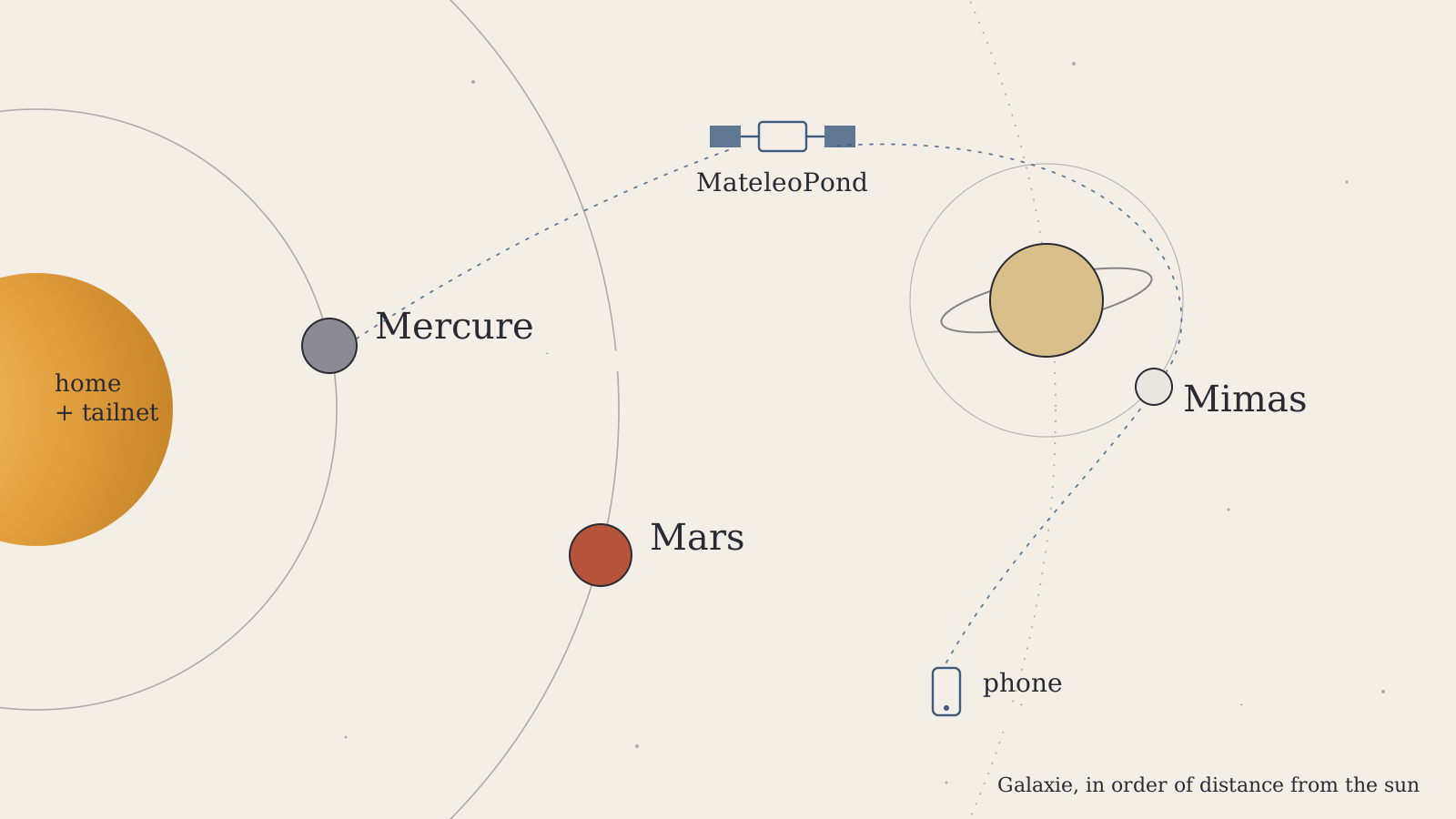
Galaxie as it stands today: three machines named after M bodies, in order of distance from the sun, with my desktop and phone orbiting around them.
A Claude subscription costs about twenty dollars a month, and for that price you can now build almost any piece of software you can describe. I find that thrilling and a little dizzying. But the demos tend to skip one part of the story: the code has to run somewhere. The agent needs a machine to clone the repo on, a place to compile and run the tests, to keep a database alive, to sit through a three-hour build while you are on a train. Software got cheap. Compute you actually control did not.
This article is about Galaxie, the small group of machines I have been building up at home for the last two years, and about how it went from a homelab hobby to the place where my coding agents live.
Naming a galaxy
Every sysadmin eventually has to name a server, and most of them end up with a theme. Some use Greek gods, some use Pokémon. I liked the idea, and I wanted something a bit stricter, because I like constraints. Georges Perec wrote a whole novel without the letter e, La Disparition, so I could at least restrict myself to one letter. The rule became: my machines are celestial bodies, their names start with M, like Matéo, and each new one sits a bit further from the sun than the last.
That gave me Mercure first, then Mars, and very recently Mimas, the small moon of Saturn with a crater so big it looks like the Death Star. A close friend of mine does the same thing with his own letter, and our two systems have started to form a shared galaxy. More on that later.
Five years of git push
For a long time my setup was the most common one there is. I started coding seriously around 2019, on a desktop PC, and GitHub was the only bridge between my machines. I worked on the desktop, pushed, and when I was in my student flat or travelling, I pulled the project on a laptop and carried on. The code moved around and the machines stayed where they were. It worked for five or six years and I never really questioned it.
The first time I needed my machines to talk to each other had nothing to do with code. It was video games. My laptop was far too weak for anything recent, so I started streaming games from my desktop with Parsec. That meant the desktop had to be on when I wanted to play, so I learned Wake-on-LAN, and with it a lot more about my home network than "the box from my ISP". And once you want to wake a machine from outside your home, you run into port forwarding, dynamic IPs and the uncomfortable feeling of exposing things to the internet. That is how I found Tailscale.
The machines
None of this was designed up front. The machines arrived one at a time, when I could afford them and had a reason, and their roles changed as I went.
Mercure came first, at the end of 2024, and it is the one that made the whole thing feel like a system and not a pile of computers. It is an HP EliteDesk 800 G4 SFF, a refurbished office PC with an i5-8500 and 16 GB of RAM, running Debian. The interesting part is the storage: two Samsung enterprise SSDs of 1.9 TB each, in Btrfs RAID1, so it survives a dead drive. Mercure hosts my services, around thirty containers behind Traefik. The one I am proudest of is Immich, which let me leave Google Photos for good. There is also a Gitea instance with its own CI runner, a music server (yes, the Barber Beats collection lives there), my location history, bookmarks, the analytics of this site, a Factorio server for friends, and Photon, a full geocoding service running on a machine under a desk. Some of my side projects live there too, like Monosky, and some deploy themselves: a cron job checks for a new image every two minutes and rolls it out. Mercure is also the only machine that is always on, so it runs UpSnap, a small web interface that wakes the other machines. The Wake-on-LAN I fought with for Parsec is now a button on my phone.
Mars is the odd one. It is a rented VPS, usually from Netcup, which I find very good value. Mars is where I put things that need a public machine for a short time: a test, a temporary service, something I do not want on my home network. It is decommissioned right now, which is normal. It comes back when I need it.
Mimas joined the day before I started writing this, and it is the reason this article exists. It is a Beelink SER mini PC with a Ryzen 7 7735HS, 8 cores and 16 threads, 32 GB of RAM and an NVMe drive. Mimas is the compute machine, the one that runs the agents.
A few devices orbit around these three without really being part of the galaxy. My desktop, MateleoPond, runs a new OS I have been testing and has an RTX 3090 with 24 GB of VRAM, which I use for local models. I have tried quite a few of them on that card and they deserve their own article, so I will keep that for later. And then there is my phone, which turned out to matter more than I expected.
Tailscale, the backbone
If you have never used it, Tailscale is a mesh VPN built on WireGuard. You install a client on each machine, log in, and every device gets a stable private address on what Tailscale calls a tailnet. The machines connect to each other directly, getting through NATs and firewalls on their own, and only fall back to relays when they cannot. I do not open a single port on my router. My laptop on hotel wifi and Mimas under my desk see each other as if they were plugged into the same switch.
The feature that changed my daily life the most is MagicDNS. Every machine is reachable by its name, so I type ssh mimas from anywhere and it works. It sounds trivial, but I no longer remember a single IP address, and nothing breaks when a machine changes networks. Tailscale SSH lets the tailnet handle authentication on some machines, and Tailscale Serve publishes a local service over HTTPS to the tailnet only. That is how my T3 Code server is exposed: it has a real certificate and a real hostname, and nobody outside the tailnet can reach it.
My friend and I have also started a small project we call Galaxy Orbit. For now it is a modest bit of monitoring, a way for each machine to report that it is alive, with a proper dashboard coming soon. Later we would like to share some of our compute between the two galaxies, and a tailnet makes that kind of thing surprisingly easy.
From VS Code Remote to T3 Code
Once Mercure existed, I started coding on it. VS Code Remote over SSH works well, and for a while it was my answer. But there was always friction, and most of it came from one thing: the sessions were fragile. If the connection dropped, my terminal went with it. If I closed the laptop, whatever was running in the foreground died. I used tmux, but it always felt like I was holding the work together by hand. Remote development was possible. It just never felt natural.
Generative AI is what made it click. In 2026 I started running several projects in parallel, with several agents on each. Claude Code, Codex, Pi, OpenCode: each harness has its strengths, and everyone on my feed was comparing them. I did not want to choose, and I did not want five terminals on five machines either. I needed something to manage the harnesses, not a sixth one. For me that is T3 Code.
I did not find it by chance. I have been watching the YouTube channel of Theo, t3dotgg, for years. It is a big part of how I keep up with the web and AI ecosystem, and T3 Code comes from him and his team at Ping. What convinced me is that it does not try to be yet another agent. It is open source, it drives the official CLIs of each provider, so I keep using my existing subscriptions, and it treats the machine as a choice you make per thread, like the model. It also moves fast, and following its development has taught me a lot about what a good interface for agents should look like.
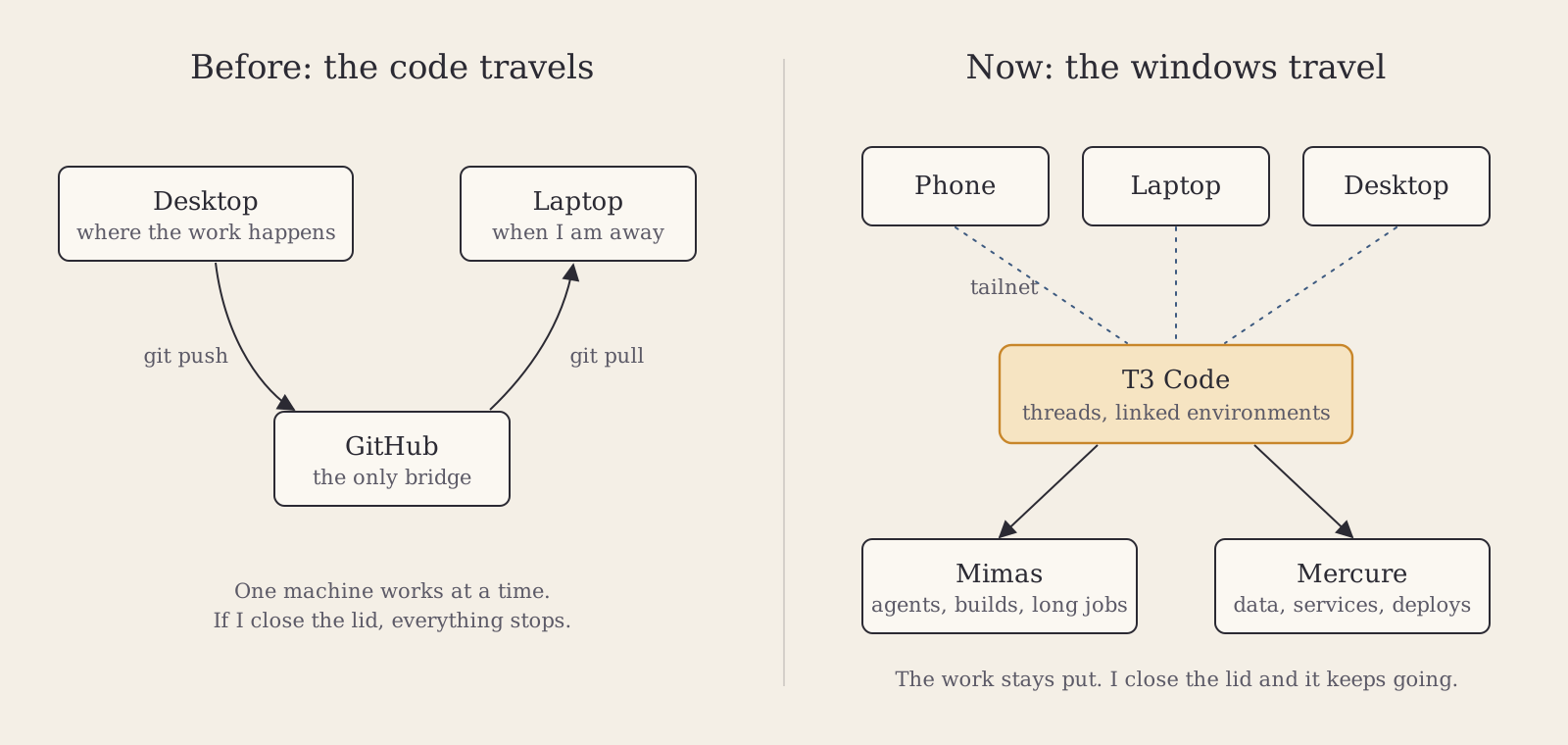
Before, the code travelled between machines through GitHub. Now the work stays on the servers.
Concretely, T3 Code is one interface for many coding agents, and it has a notion of environments: a T3 server can run on any machine, and environments can be linked together. On Mimas, the T3 server runs as a systemd service, so it starts at boot and does not care whether I am connected. From my desktop, my laptop or my phone, I open a thread, pick the machine and the model, and the agent works over there, in its own worktree. When I come back hours later from another device, the thread is where I left it. A thread can delegate a subtask to another agent, even one from a different provider, and I can review the diff, the worktree and the pull request from the same place. The fragile session problem is gone, because there is nothing left to keep alive on my side. The work lives on the server, and my devices are windows onto it.
To give an order of magnitude, the T3 environment on my desktop, which did all the work until Mimas arrived, has accumulated a few hundred threads in a little over two weeks. A good third of them were not started by me but by other agents delegating subtasks. Claude does most of the work, Codex a fair share, and Pi with cheap models takes the small, well-specified jobs. I ended up writing two small tools around it. The first is a router that looks at the weekly quota left on each subscription and switches the default model to the provider with the most allowance per day until its reset. The second goes the other way: a script that powers off my desktop after one in the morning if nobody has touched the keyboard. The desktop can sleep, while Mercure and Mimas stay up.
What it changes
The first change is the obvious one: I can close the laptop and the agents keep working. A long refactor, a build, a test suite, an afternoon of reverse engineering some undocumented binary: I start it, I leave, and I check on it from my phone. It changed my days more than I expected.
The second change came right after. As soon as the agents could run unattended, the hardware became the limit. My desktop is a strange beast, a 4-core Ryzen from 2018 with 16 GB of RAM sitting next to a 3090. It was fine for one agent, and it started choking with five in parallel, each with its own dev server and test suite. Mimas exists because of that. I think a dedicated, always-on machine will become normal for people who use agents a lot, and projects like Hermes Agent already assume you have one.
The third change is less pleasant. With enough hardware, the limit was me.
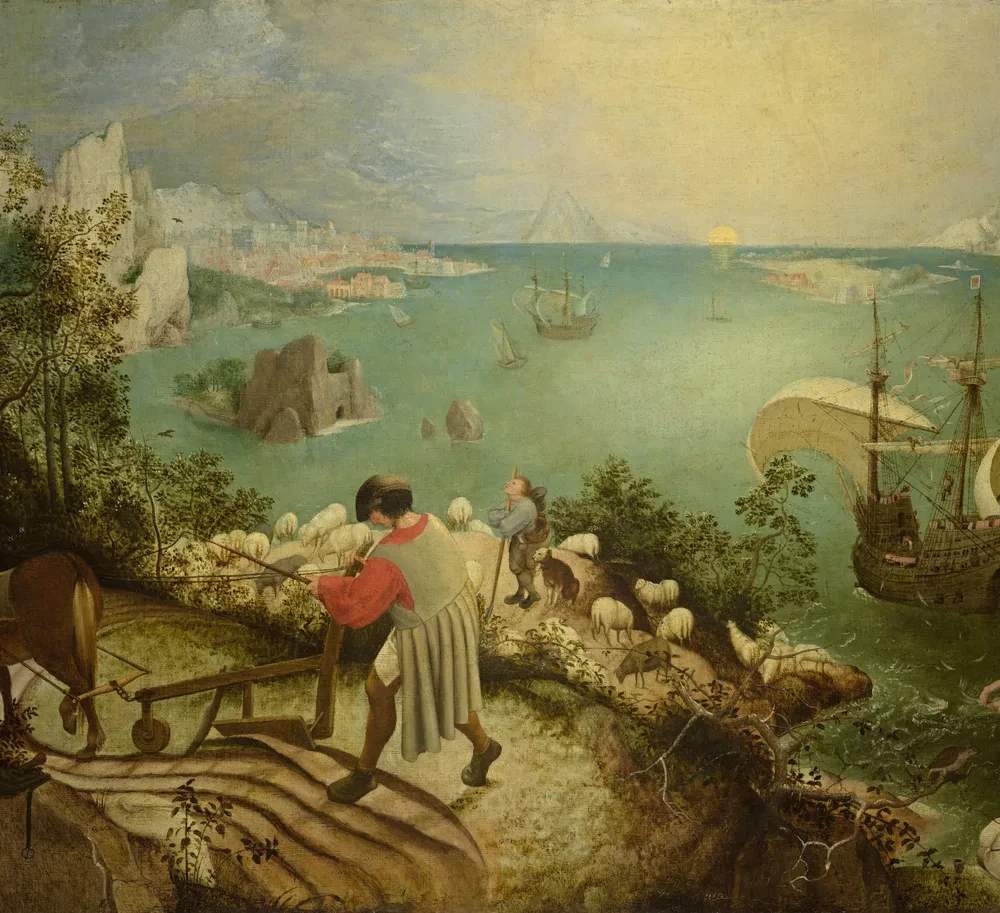
Landscape with the Fall of Icarus, attributed to Pieter Bruegel the Elder, around 1560. Royal Museums of Fine Arts of Belgium, Brussels. Icarus is the pair of legs disappearing into the sea, bottom right.
Icarus was given wings, was told not to fly too close to the sun, and did it anyway. In this painting his fall is almost a detail: a pair of legs in the water, while the ploughman in the foreground keeps ploughing. I recognise a bit of that in how I have been working. There is always the feeling of being one prompt away from the solution, so you send one more. I catch myself feeling guilty when I have not used my whole weekly quota, or when I go to lunch without launching something first. I check my phone just to see whether an agent has pushed. On the train, where I used to read articles, I now start a few tasks so they are done by the time I sit at my desk. A post that went around on X summed up the mood: when you wake up, send a good morning message, not to your girlfriend but to Claude, so your five-hour usage window has already passed by noon and the limit resets in time for the afternoon. It is a joke, and it is also the kind of thing I have caught myself considering.

June 20, 2026PSA: when you wake up, reach for your phone immediately. Do NOT scroll Instagram reels. Send a good morning message. Not to your girlfriend, to Claude.
That way, you can start the clock for your 5 hour Claude Code usage limit while you freshen up and head to the office. At noon, the 5 hour window would have passed and the usage limit would reset. Then you can generate more shareholder value.
I have not burned out, and I do not want to dramatise it. But I read the stories coming out of Silicon Valley about fried brains and endless productivity races, and I do not think they are exaggerated. The possibilities are exciting, and the amount of work one person can push forward now is impressive. So I try to decide when to stop before I start, and some evenings I leave the quota unused on purpose. Some evenings I would rather be the ploughman.
The limits
The first limit is the irony at the heart of the project. Galaxie is about owning my infrastructure, and the network that holds it together depends on a third-party service. Tailscale's coordination server is not mine. I accept that for now, because the product is excellent and the free tier is generous, and I know the exit exists: Headscale is an open source, self-hosted implementation of the control server. If Tailscale ever changes its terms in a way I do not like, I can move. That is enough for me today.
The second limit is money, and more precisely the price of hardware. The RAM shortage this year has been brutal for anyone building a homelab. A 32 GB machine that was an easy buy a year ago now needs a real reason. I would love a second 3090, or one of the small DGX Spark boxes, to run bigger local models, and that is not within my means right now. The good news is that the second-hand market is still very interesting. Mercure is a refurbished office PC, its SSDs are enterprise drives built to last, and it has been running without complaint for two years.
The last limit is plain maintenance. Thirty containers is thirty things that can break. As I write this, the container that is supposed to keep the others updated is itself stuck in a restart loop. Self-hosting means you are on call, and sometimes you caused the outage yourself.
Owning the stack
Price matters less than people think, even if over a few years a used mini PC costs far less than an equivalent VPS. Gabe Newell once said piracy is a service problem, and I think self-hosting works the same way: people switch when the alternative is better. Today it often is. Immich is better than what I had before, and my music server is better than the streaming apps I was paying for.
If AI makes software abundant, the scarce part becomes the hardware and the know-how to run it. That is why I encourage anyone curious to get a machine of their own, whether it is a five euro VPS, a Raspberry Pi or an old office PC from a refurbisher, and to play with the whole stack, from the network to the agent. It is the best way I know to understand what is actually happening under all the demos.
I am not dogmatic about it. MicroVM platforms like Vercel Sandbox are getting very good at giving each agent a disposable machine, and AWS has just announced GPU support for Lambda, which would have sounded absurd not long ago. Some of my agents will end up running in someone else's data center. But my photos, my music, my code and the machines my agents think on, I want to keep at home, in my own small galaxy, where I can go and touch the hardware when something breaks.

November 20, 2026YOU CAN PUT YOUR LLM IN A LAMBDA FUNCTION! TELL EVERYONE!
LAMBDA FUNCTIONS CAN NOW RUN ON GPUS!
The next M planet is already on my mind. It will wait until RAM is affordable again.